
Blog
February 12, 2026

PHP job queues are a popular tactic for developers who want to defer, schedule, and manage recurring jobs within their applications. However, there are not many tools purpose-built for PHP applications, making it complicated to fully deploy and manage efficient PHP queuing.
In this blog, I dive in on the basics of PHP job queues, including an overview of available PHP queue systems and how they help (or hinder) PHP teams as they queue and scale their applications. I also go over the ZendHQ JobQueue and explore how it makes queuing a less complex and more efficient process.
Back to topWhy Is PHP Job Queuing Necessary?
PHP queuing is necessary as web applications can receive a lot of traffic. Much of that traffic requires data processing, such as processing uploaded images or videos, crunching data, aggregating data from multiple web services, and more.
Often, the user submitting the data or information, or making a request for it, does not require it immediately. For example, if a mobile application is submitting information via an API, it may not need confirmation of completion, only that the request was accepted. In this case, how can you prevent these sorts of requests from tying up your web servers?
The most common answer is to add a PHP queuing system to your web app. PHP job queues will accept the data, queue it for later processing, and return a response immediately. There are many options for accomplishing this, and the correct fit for you will vary based on your app's needs and available infrastructure.
Back to topWhat Are Popular PHP Queuing Technologies?
When it comes to PHP queuing systems, you have a variety of options. These include topic queuing technologies, PHP queuing libraries, and custom-written infrastructure. However, not many of these are a perfect fit or built specifically for PHP use cases.
Topic Queuing Technologies
“Topic” queues, such as ActiveMQ or RabbitMQ, allow you to send a message to a queue topic. Workers subscribe to topics, then process the messages as they come in. However, when it comes to PHP, this would mean writing PHP workers that subscribe to the queue and which receive message notifications.
PHP, while increasingly robust with each new version (most recently PHP 8.5), was not really designed for this sort of thing. It operates under the assumption that it gets torn down after each request, allowing it to release memory and resources. Long running processes do not benefit from this architecture, which means that sooner or later, your PHP process will end up dying due to lack of resources.
This means that you will require some sort of process manager for effective PHP queuing, such as supervisord, to manage your workers. Let’s count up what you need:
- A PHP extension for communicating with the message queue
- A custom PHP script for subscribing to the queue and processing jobs, as well as validating the jobs before processing
- Likely a separate machine or container for the worker, meaning additional deployment tasks
One other thing to note: with topic queues, every worker that is notified of a message processes it. If you want a message processed exactly once, you will need to write logic into your workers that can add locking mechanisms to prevent duplication of processing.
In short – topic queuing can be an effective solution, but establishing and maintaining it within PHP applications is a complex and often challenging undertaking. Many teams find themselves without the developer time or resources to make the most of this particular PHP queuing technology.
PHP Queue Libraries
Another PHP queuing option is to use a PHP queue library.
Within the PHP ecosystem, there are a number of queuing libraries are compatible with a variety of backends. These include everything from relational databases to key/value stores like Redis, to even topic queues as outlined above. Examples include Laravel’s Queue component, and the Enqueue library.
The benefit to PHP queuing libraries is that they provide scripts and utilities out of the box to enable job locking and worker creation. However, they really only allow for simple job deferment; scheduling jobs or adding recurring jobs requires different libraries, if they are supported at all. Finally, you run into the same problem of requiring a process manager for your workers.
One thing to be aware of with PHP queuing libraries is that the backend you choose can make a huge difference to application performance. Having the ability to re-use your relational database for queuing can seem like a fantastic idea — until you discover that the workers you create are now polling the database repeatedly to discover new jobs, adding load to your database server!
Custom-Written PHP Queuing Infrastructure
Finally, you can also write your own PHP queuing infrastructure, using existing queuing backends, or non-traditional queuing backends such as Redis or Beanstalkd.
While this is often attractive from a cost perspective, it also means you will end up writing and maintaining your own scheduler and workers. As with the above options, you will still require a process manager for your queue workers.
What About Non-PHP Workers?
Using PHP is fantastic…until it is the wrong tool for the job.
In some cases, a big reason to have job deferment and queues is to allow processing data using an entirely different runtime, or a third-party service. As an example, you might have written your order fulfillment in Java, but want to use PHP for your web API due to maintainability and ease of deployment, or due to existing integrations with your content management system or ecommerce solution. Using a queue system, you could have workers in Java that handle the data that PHP queues.
Back to topPHP Queuing Made Easy With ZendPHP and ZendHQ
Zend makes managing your PHP job queue simple via JobQueue for ZendPHP runtimes. Delivered via the ZendHQ extension, JobQueue allows for job deferment, scheduling, and recurring jobs; provides the ability to process jobs via HTTP or CLI workers, and thus allow for non-PHP workers seamlessly; and allows for minimal infrastructure to facilitate each of these.
On top of these functions, JobQueue provides monitoring capabilities for queue jobs. You will receive notifications when a job has been delayed longer than a configured threshold or when jobs fail. This includes the capture of worker output, allowing you and your team to better debug worker issues.
Check out this video for a few more details, then dive into the following PHP queuing guide for in-depth instruction:
Free Trial
See How ZendPHP + ZendHQ Fit Within Your Infrastructure
The following walk through requires ZendPHP runtimes and the ZendHQ extension. Try both free for 21 days or learn more via the buttons below.
Getting Started With the Zend JobQueue
To utilize JobQueue, you will need:
- A running installation of ZendHQ
- A ZendPHP installation with the ZendHQ extension enabled and configured to point to your ZendHQ instance
When those are configured correctly, your PHP application can now exercise the ZendHQ JobQueue PHP API, which will allow you to create and manipulate queues, and to create, manipulate, and query jobs.
Let's start with the basics. JobQueue operates one or more queues, which in turn process jobs. When creating a job, you can specify that it should run:
- As soon as possible
- At a specified, later time and/or date
- On a recurring schedule
Within a queue, jobs are processed in the order received, unless they are scheduled for later or on a recurring schedule, and additionally based on any priority they are created with; the priority is one of low, normal, high, or urgent.
HTTP or CLI Job?
You will define a job as either an HTTP or CLI job. Here is a quick reference for the difference between the two, with more detail below:
| Aspect | HTTP Jobs | CLI Jobs |
|---|---|---|
| Definition | ZendHQ sends an HTTP request to a designated URL. | Executes a given binary directly on the ZendHQ node. |
| Execution Location | Can process jobs anywhere (e.g., another application, Spring Boot app, serverless cloud app). | Runs directly on the ZendHQ node as the same user under which the ZendHQ daemon runs (not as root). |
| Customization | Define HTTP method (e.g., GET, POST), headers, and request body. | Specify environment variables for the executable. |
| Job Options | Supports job priority, timeout, retries, retry intervals, and output persistence. | Supports job priority, timeout, retries, retry intervals, and output persistence. |
| Default Options | Can define default options for jobs on each queue to simplify configuration. | Can define default options for jobs on each queue to simplify configuration. |
HTTP Jobs
In the case of HTTP jobs, ZendHQ will send an HTTP request to the designated URL, based on how you define the job (e.g. GET vs POST, with or without additional HTTP headers, with or without a request body, etc.).
HTTP jobs give you the ability to process your jobs anywhere, whether that's another install of the same application, a Spring Boot application, or a serverless application running in the cloud. When running the job within the same cluster, you will be able to have separate worker pools for your public-facing application vs. your job workers, which will help your performance profile. If that application is also connected to ZendHQ, you'll get built-in monitoring and code tracing as well — and the option of triggering additional jobs that should run after the current completes.
CLI Jobs
For CLI jobs, the given executable will be run directly on the ZendHQ node as the same user under which the ZendHQ daemon runs (which is why it's important not to run it as root!). Additionally, you can specify environment variables to set when running the job.
CLI jobs allow you to run arbitrary binaries. One use case might be for scheduling periodic syncs or backups of uploaded content, using system-level tools instead of PHP.
JobQueue Options and Workflows
Each job can specify options that define the behavior of the queue runner when interacting with the job. These include the aforementioned job priority, how long to wait for the job to complete before cancelling, how many retries to make in case of failure, how long to wait between retries, and whether or not to persist execution output on job completion.
In the case of HTTP jobs, this also includes whether or not to validate TLS/SSL. More importantly, you can provide a set of default options for jobs on each queue, which helps remove the amount of configuration for each individual job itself, simplifying usage within your application.
The basic workflow becomes:
- Create an instance of the
ZendHQ\JobQueue\JobQueueclass - Pull or create the
ZendHQ\JobQueue\Queueinstance from the JobQueue you wish to use - Create the job, using either
ZendHQ\JobQueue\HTTPJoborZendHQ\JobQueue\CLIJob - Schedule the job with the queue, optionally with a scheduled time and/or date, or a
ZendHQ\JobQueue\RecurringSchedule, and optionally with specificZendHQ\JobQueue\JobOptions
This sounds like a lot, but we'll demonstrate how easy it is momentarily. For the purposes of demonstration, we'll assume that:
- You will be using the default queue, which is already created, with the default job options
- You will not be setting different options for your jobs
Note that setting job options, queue creation, and queue retrieval will be covered in later sections.
Scheduling Jobs in the JobQueue
Getting the default queue involves two lines of code:
$jq   = new \ZendHQ\JobQueue\JobQueue();
$queue = $jq->getDefaultQueue();
Next, let's create a job that will hit another URL (https://example.com/product/increment) using the HTTP POST method. Further, we'll add an HTTP header with a shared token stored in the ENV:
$job = new \ZendHQ\JobQueue\HTTPJob(
    'https://example.com/product/increment',
    HTTPJob::HTTP_METHOD_POST
);
$job->addHeader('X-API-TOKEN', getenv('QUEUE_API_TOKEN'));
Other methods exist for setting the request content type, query string arguments, and request body. Visit our ZendHQ JobQueue documentation for more details.
From here, we can now schedule this job with the queue:
$queue->scheduleJob($job);
This will schedule it to run as soon as possible. However, what if we want to have it run three hours from now? In that case, we can specify a DateTimeInterface instance with the scheduled time:
$queue->scheduleJob($job, new \DateTimeImmutable('+3 hours');
How about defining a CLI job, though? A CLI job receives the executable line it should run as an argument, and then you optionally can set any ENV variables that should be present:
$job = new ZendHQ\JobQueue\CLIJob('/usr/local/bin/some-binary --a-flag --an-option value');
$job->setEnv('QUEUE_API_TOKEN', getenv('QUEUE_API_TOKEN'));
But from there, scheduling the job is exactly the same.
Zend JobQueue: Frequently Asked Questions
What If I Have More Than One Queue?
We recommend using a queue per job type, or per group of related job types. If you are familiar with Zend Server (which reaches end of life at the end of 2027), this is most likely a pressing question, as Zend Server only had a very small number of job queues available and queue creation was expensive.
In comparison, ZendHQ queues are lightweight and recommended for grouping jobs. This makes it possible to suspend a single queue while you debug an issue without affecting all other queues. It also ensures that you can have job definition characteristics that take into account the type of work each job performs (e.g., setting a longer timeout for jobs that are doing heavy processing, or more retries for HTTP jobs that hit a service known to have latency issues).
Within an application, we recommend the following pattern when retrieving a queue, to ensure it exists:
$queue = $jq->hasQueue('scheduled')
    ? $jq->getQueue('scheduled')
    : $jq->addQueue('scheduled', $queueDefinition);
The class ZendHQ\JobQueue\QueueDefinition defines the behavior of a given queue. Its constructor has two arguments, the queue priority (i.e., when multiple queues have jobs that need to process, which queue should get priority), and a set of default jobs options. As such, we'll cover that creation in the next section on defining and overriding job options.
How Do I Define and Override Job Options?
To set an individual job's options, or to create default options for an entire queue, you create a ZendHQ\JobQueue\JobOptions instance. The constructor signature is:
function __construct(
    ?int $priority,
    ?int $timeout,
    ?int $allowedRetries,
    ?int $retryWaitTime,
    ?int $persistOutput,
    ?bool $validateSsl,
)
Here are explanations for the above example:
$priorityis one ofJobOptions::PRIORITY_LOW,JobOptions::PRIORITY_NORMAL,JobOptions::PRIORITY_HIGH, orJobOptions::PRIORITY_URGENT.$timeoutand$retryWaitTimeindicate second intervals$allowedRetriesmust be greater than or equal to zero$persistOutputcan be one of JobOptions::PERSIST_OUTPUT_NO,JobOptions::PERSIST_OUTPUT_YES, orJobOptions::PERSIST_OUTPUT_ERROR(persist job output only if the job fails)
There are also several retry algorithms present — such as an exponential backoff — which you can select and configure.
A JobOptions instance is used in one of two places:
- To define the default job options for a queue
- To define specific job options for a job when scheduling the job
For a queue, there are two ways to set the default job options: at creation of a queue, or later to modify a queue. When creating a queue, you will create a QueueDefinition, passing your JobOptions to its constructor:
$queue = $jq->addQueue('your-queue-name', new \ZendHQ\JobQueue\QueueDefinition(
   \ZendHQ\JobQueue\QueueDefinition::PRIORITY_HIGH,
    $jobOptions,
));
How Do I Set Queue Names?
Queues have associated names. These are used to identify and retrieve queues from JobQueue:
$queue = $jq->getQueue('your-queue-name');
They are also represented in the ZendHQ GUI, which allows you to quickly find the queue you are interested in inspecting.
If you already have a queue instance, you can use the setDefaultJobOptions() method on its composed definition, and then tell JobQueue to modify the queue:
$queueDefinition = $queue->getDefinition()
$queueDefinition->setDefaultJobOptions($jobOptions);
$jq->modifyQueue($queue, $queueDefinition);
How Do I View Completed Jobs?
Creating and scheduling jobs is fine, but how do you know what jobs have completed, and whether or not they completed successfully?
Use the ZendHQ GUI!
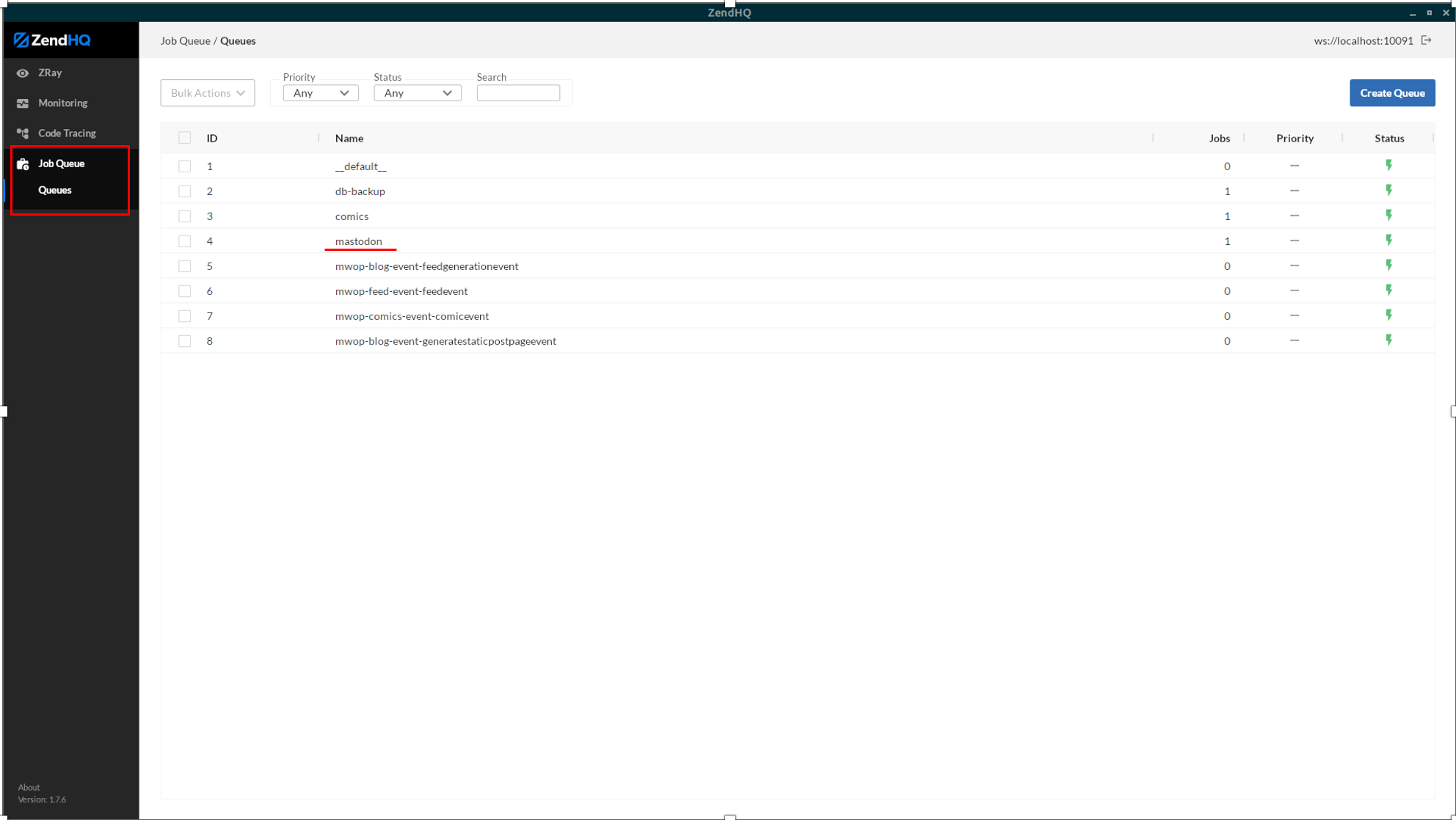
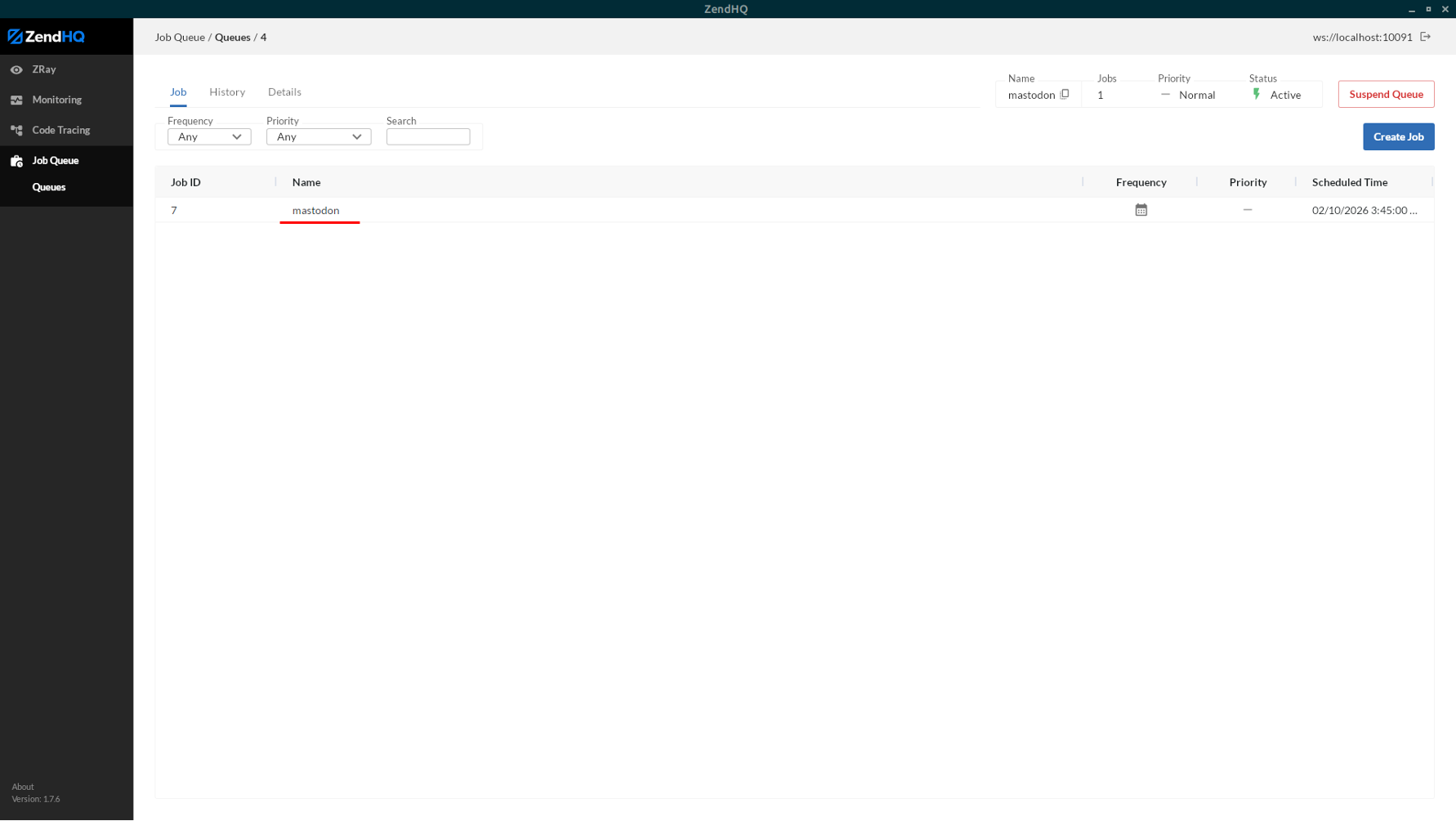
Within the ZendHQ GUI, if you have the associated permissions, you can view JobQueue status by selecting the "Job Queue" item from the left navigation. This opens up a list of queues at first, and you can then select which queue you want to see the upcoming schedule for, as well as job execution history.
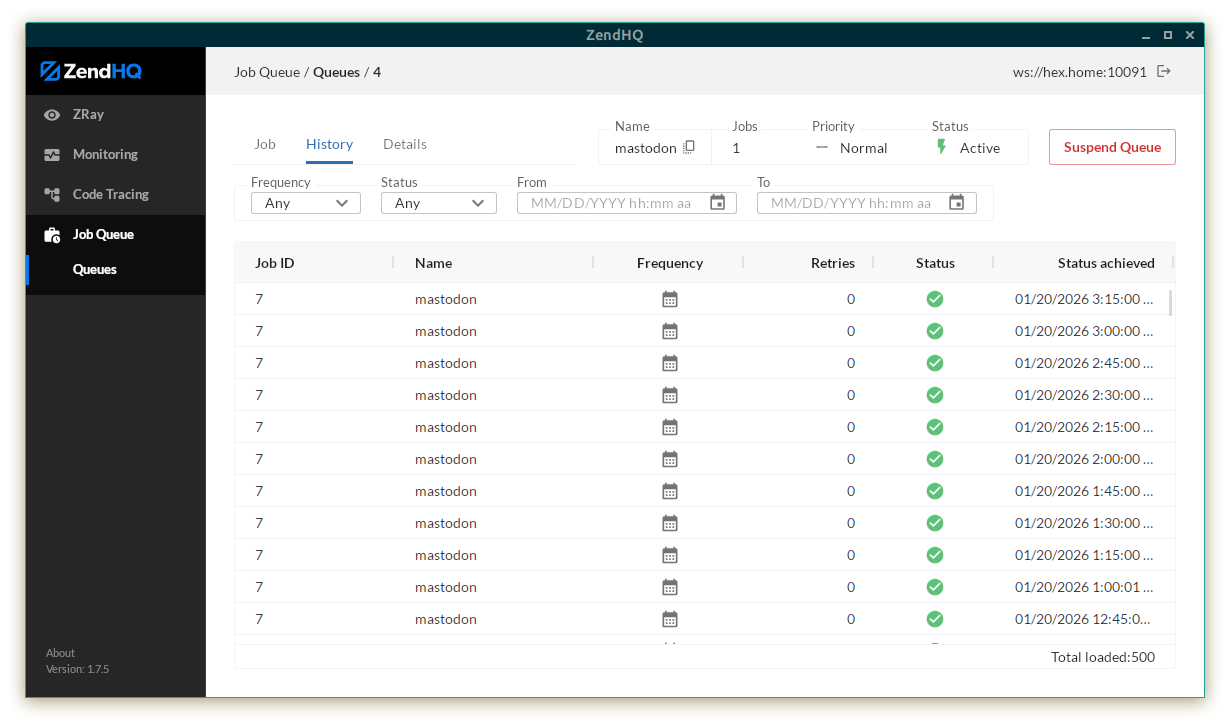
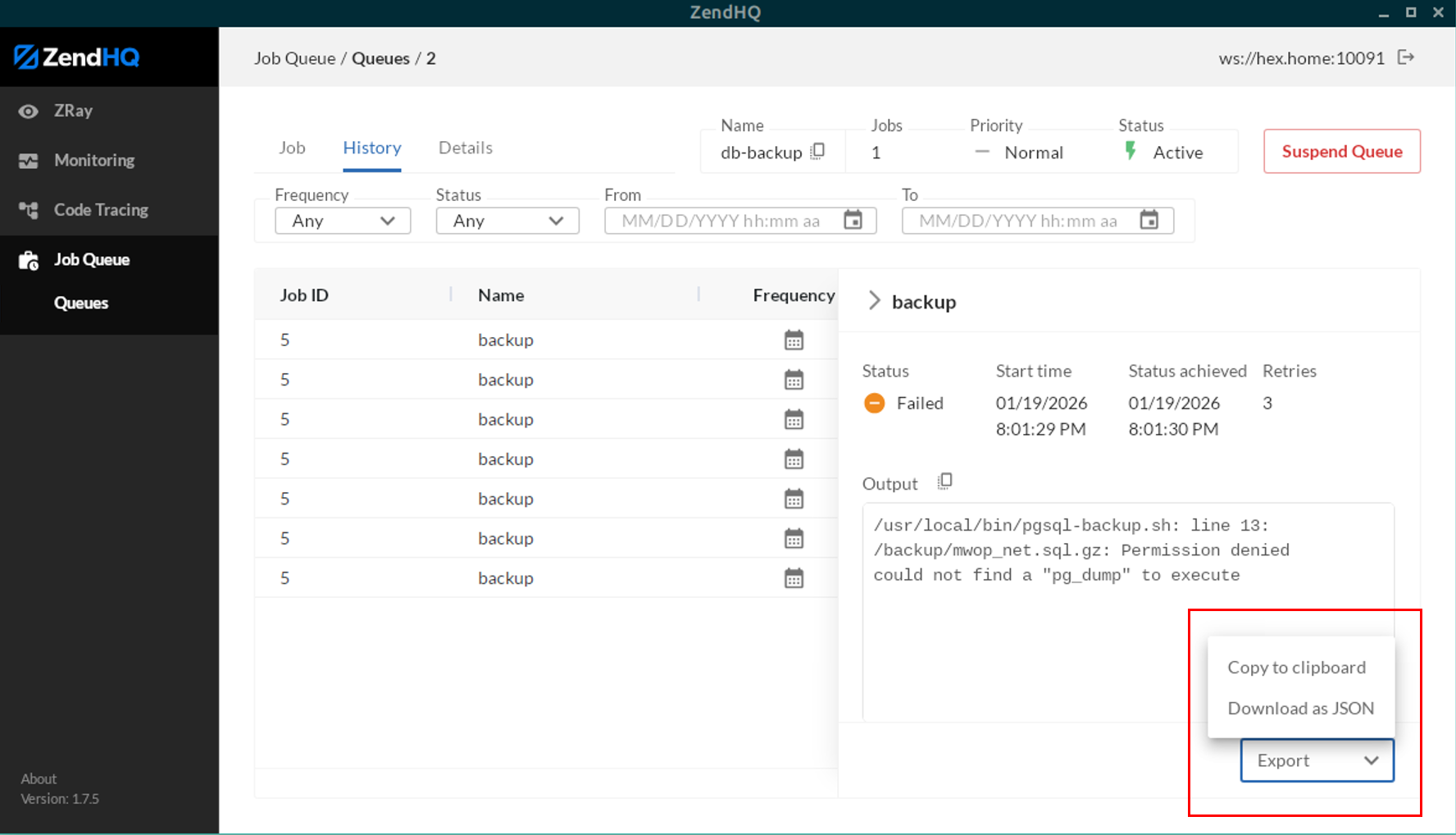
The "History" view gives you a list of completed jobs, along with completion time and status. Clicking on any given job will give you job details; if your queue or job indicated via its options to persist output, you will also see the job execution output, whether that's the output emitted to the command line, or the HTTP response.
How Do I Inspect and Troubleshoot Running Jobs?
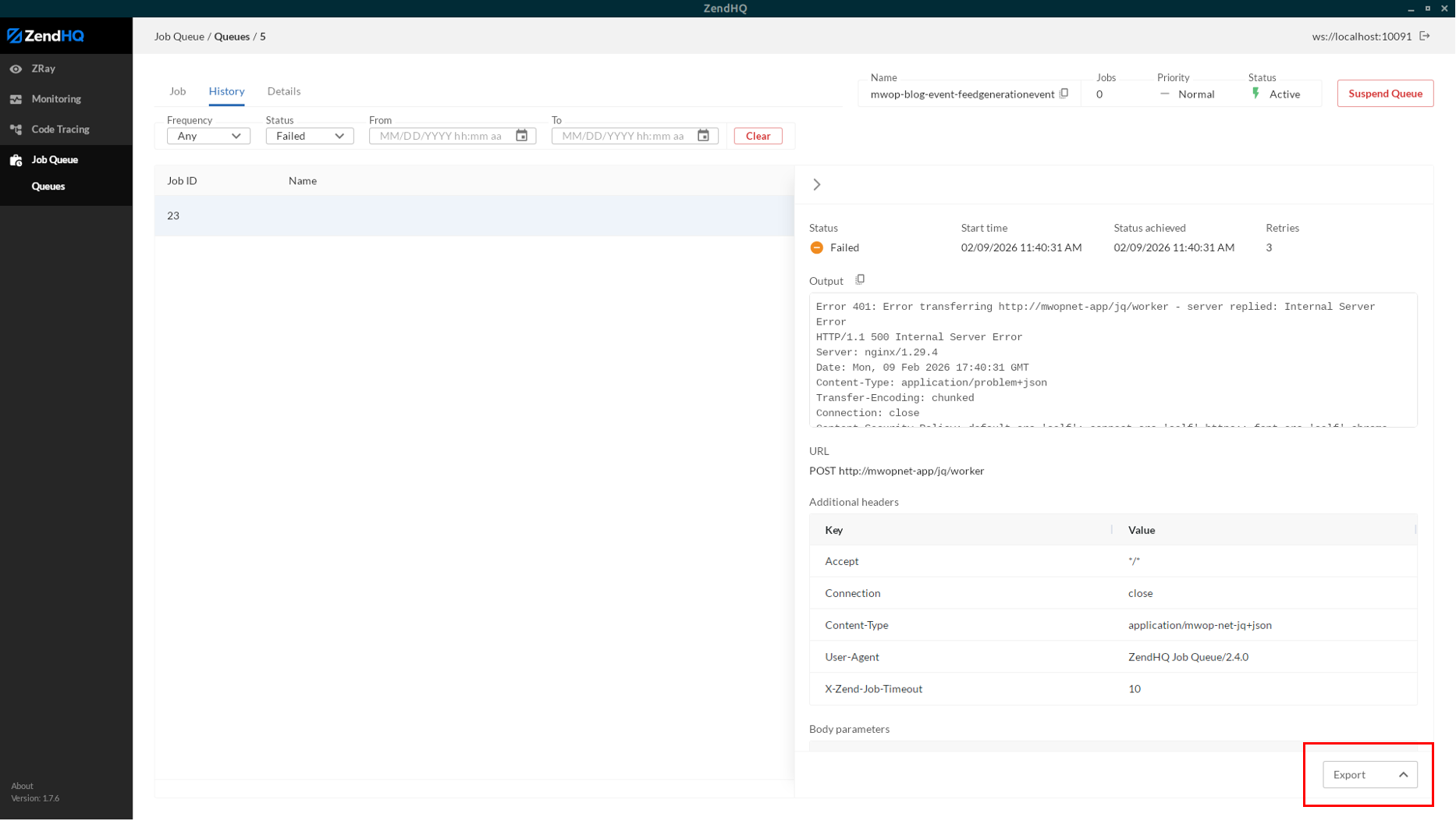
We recommend setting the job option to persist output on error. This reduces the amount of noise in your job history, but also gives you output when you likely most need it: when a job fails.
Even better: as of ZendHQ GUI 1.7.5, when inspecting a job, you now have a button at the bottom to export the job details, which will include the output.
Back to top
Final Thoughts
Implementing an effective PHP job queue can dramatically improve application performance, stability, and scalability, but the process is not without challenges. If your team's resources are already stretched thin, or if you do not have in-house PHP expertise, you may benefit from partnering with a third party to provide additional support.
Zend is here to help. In addition to providing JobQueue through ZendPHP and ZendHQ, we also offer a full suite of PHP Professional Services. Our experts are ready to help you design, deploy, and optimize JobQueue implementations that are tailored to your applications and infrastructure. Plus, paired with enterprise-grade technical support via ZendPHP + ZendHQ, you gain ongoing assistance to troubleshoot issues, tune performance, and keep your queueing environment running smoothly at scale.
Mission-Critical PHP Made Possible
ZendPHP + ZendHQ give your organization the right tooling — back by the right expertise — to automate PHP job queues with confidence. Learn more via the buttons below.
Additional Resources
- On-Demand Webinar - Optimizing Modern PHP With ZendPHP + ZendHQ
- On-Demand Webinar - How Queuing Enables PHP at Scale
- Blog - Introducing the Enterprise Web Platform
- Blog - Scaling PHP Applications to Meet New Demand
- Blog - Exploring ZendHQ Database Query Introspection
- Blog - PHP Code Tracing With ZendPHP and ZendHQ
- Blog - IBM i Open Source Package Management
- Blog - Using a GitOps Model for Web App Development