
Blog
April 23, 2026

OpenAI PHP integrations can feel deceptively simple until you're juggling authentication details, SDK choices, token-based pricing, and more. If you're trying to add AI to an existing code base (or shipping something new), it's easy to get stuck on how to implement your first API call, evaluating which AI model is best, and the realities of keeping applications fast, affordable, and secure.
This guide is here to help. Whether you're a seasoned PHP developer or just getting started, you'll learn how to easily connect your PHP applications to OpenAI's API, explore top generative AI models, and discover proven strategies for managing costs and optimizing performance.
Back to topHow to Set Up ChatGPT PHP Integrations
To connect to the OpenAI API platform, first create an OpenAI account. You can then generate an API key from the dashboard. You can store your API key in an environment variable and use the PHP getenv() function to retrieve its value.
Alternatively, store the API key in a text file, and use a simple file_get_contents() call to pull it into your application. The point is that you don't want to hard code the API key into your application code.
Connecting to the OpenAI Platform
The connection to the appropriate API endpoint involves sending a precisely formatted JSON string. You can build the connect string using a standard PHP array and then invoke json_encode() before sending the request. Refer to OpenAI's API documentation for specifics. I have found the curl examples to be the most helpful. In fact, you can issue a simple command line curl request to test your request before finalizing your PHP code.
Alongside the JSON string you'll also need to send an Authorization header following this syntax: "Authorization: Bearer YOUR_API_KEY". Always store API keys securely and never expose them in public repositories, manage rate limits, and monitor token usage to control costs.
Installing Necessary PHP Libraries
PHP applications don't require any specific library code or SDKs to make the connection. That having been said, most of the major PHP frameworks, including Symfony and Laravel, offer components that ease connections to OpenAI.
Another popular client is openai-php/client, weighing in at over 22 million downloads from packagist.org. The advantage of using such components or clients is that they're actively maintained and help avoid tiresome JSON configurations.
Making Your First OpenAI API Call
Aside from using one of the clients mentioned earlier, you can make the API call using a standard PHP I/O call via fopen() / fgets(), SplFileObject, or the cURL extension. The latter is preferred as it's highly efficient and can support multiple connections.
See the below example for how to make a simple call to OpenAI asking for a language translation.
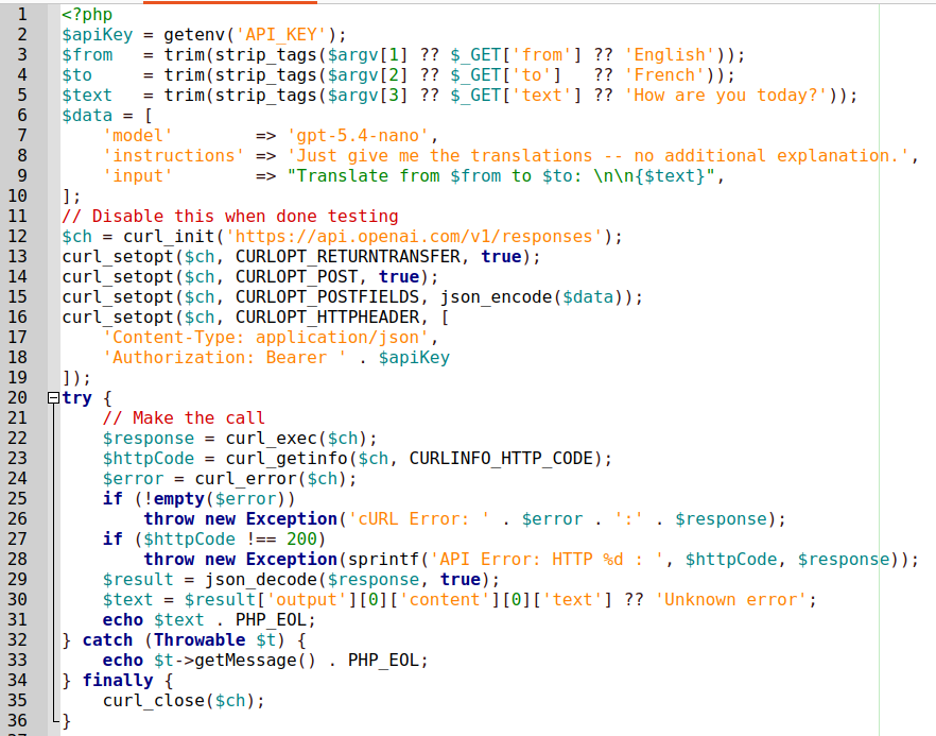
If we run this example from the command line, here is the result:
ed@localhost:~
$ php Documents/Zend/Code/open_ai_call.php English German "How are you today?"
Wie geht es dir heute?
PHP Certification
Become a Zend PHP Certified Engineer
Showcase your expertise and gain industry recognition by taking the Zend PHP Certified Engineer exam. Register now to get started, or explore our PHP certification preparation materials.
Managing Costs for OpenAI PHP Applications
One of the most critical considerations to make when creating an OpenAI PHP application is how you plan to manage costs. The first step is to understand token-based pricing models, and the second is to apply smart optimization strategies to ensure your OpenAI PHP app remains both performant and cost effective.
OpenAI and ChatGPT Pricing Models
OpenAI's API pricing is token-based, where tokens represent chunks of text (roughly 4 characters or ¾ of a word). Costs vary by model and are usually quoted in price per one million tokens.
In general, the more recent, high-end models give you a better quality result, but charge more. Pricing is split between input tokens (your prompt) and output tokens (the response), with output typically costing more. Some models offer cached input pricing for repeated prompts, which reduces costs. Image generation, audio, and embeddings have separate pricing tiers. Costs are billed monthly based on usage.
TIP: Monitor consumption via the OpenAI dashboard, and set usage limits to avoid unexpected charges.
Let's look at an example.
As of the writing of this blog, the OpenAI Developers pricing documentation shows that the price for gpt-5.4 "short" context (less than 272K tokens) is set at $2.50 for input, $0.25 for cached input, and $15.00 for output. For requests containing greater than 272K tokens, pricing is roughly double.
In contrast, prices for the gpt-4.1-nano model is, respectively, $0.10, $0.025 and $0.40 per one million tokens. But, as the saying goes, "you get what you pay for," meaning that the output from the latter model might not be sufficient for your needs.
OpenAI PHP Optimization Strategies to Make the Most of Your Resources
To optimize OpenAI PHP API usage, choose the least expensive model that meets your requirements, reserving powerful models for complex tasks. Other tips include:
- Use prompt caching to reduce costs on repeated inputs
- Keep prompts concise and specific to minimize input tokens, and limit response length using max_tokens
- Implement caching to avoid redundant API calls for identical queries
- Batch requests where possible and use streaming to improve perceived performance
- Leverage embeddings for semantic search instead of repeated completions
Also, as a general overall consideration, monitor token consumption via the OpenAI developer dashboard, set spending limits, and regularly audit usage patterns.
Back to topBest Practices for ChatGPT PHP Applications
Building ChatGPT PHP applications requires careful planning around security, performance, and maintenance. Following established best practices ensures your application remains reliable, cost-efficient, and compliant with the pertinent data privacy standards.
Put Security and Compliance First
Never hardcode API keys. You can store them in environment variables or separate text files not included in your version control setup. Sanitize all user inputs, enforce rate limiting, and ensure compliance with data privacy regulations like GDPR to protect sensitive user information.
Many GenAI platforms, OpenAI included, add checks for attempts to "jailbreak" the AI. This is a dangerous new form of attack that could potentially end up revealing sensitive information.
Learn More About PHP Security Best Practices
Consider Performance and Scalability
Use asynchronous requests, response caching, and job queue systems to handle high traffic efficiently. Select lightweight models for simple tasks and optimize prompt length to reduce latency and control token consumption costs.
Include Monitoring and Maintenance Strategies
Regularly monitor API usage, error rates, and response times via logging tools. Set spending alerts, track model updates, and continuously refine prompts to maintain optimal application performance and reliability.
As a shameless plug: the ZendHQ extension for ZendPHP runtimes offers excellent observability capabilities that can help in this area. Both are available for a 21-day free trial so you can see how they improve your infrastructure and fit with your existing system.
Back to topOpenAI, ChatGPT, and PHP: Frequently Asked Questions
AI has transformed how we build web applications. As a PHP developer, integrating AI capabilities into your projects opens a world of possibilities, from creating intelligent chatbots to delivering personalized user experiences. Here, find answers to your most frequently asked questions about OpenAI PHP integrations.
What Is OpenAI?
OpenAI is an artificial intelligence research organization that develops AI models designed to understand and generate human-like text. These models are widely used across industries to power applications like chatbots, content generation, recommendation systems, and more.
For PHP developers, the OpenAI API opens the door to limitless possibilities in your PHP applications (well, limitless within your budget, of course). Imagine a PHP application that can make a call to a multi-lingual assistant who works 24/7, never sleeps, and has access to an information base spanning the entire Internet!
What Are the Major GenAI Models for PHP Developers to Know?
OpenAI and other organizations have developed a variety of generative AI (GenAI) models, each with unique strengths and use cases. Here's a brief overview of several of the more popular models:
- GPT (Generative Pre-trained Transformer) — GPT is OpenAI's foundational model family, known for conversational ability and versatility. ChatGPT is a consumer-facing product built on GPT models, widely used for chatbots and interactive applications.
- Claude — Developed by Anthropic, Claude has three primary variants as of this writing: Opus, Sonnet, and Haiku. Anthropic has also released Claude Code which is an AI agent that can be locally installed. (As a note and at time of writing, the much discussed Claude Mythos has not been released due to security concerns.)
- Gemini — A Google DeepMind model designed for advanced reasoning and problem-solving tasks.
- LLaMA (Large Language Model Meta AI) — Meta’s contribution to the AI space, optimized for research and experimentation. LLaMA is notable in that it's open source and is self-hosted.
- DeepSeek — A specialized model for deep search and information retrieval tasks, most well-known for its ability to run on low-end hardware.
- Perplexity — Known for its ability to generate highly coherent and contextually relevant text.
- xAI — xAI, a brainchild of Elon Musk, offers Grok, and also Grok Code Fast. The latter is rapidly gaining popularity among developers as it's both fast and directly targets the programming market.
How Do I Choose the Right AI Tools for My Application?
Each of these tools and GenAI models deliver different benefits and abilities. Use these considerations to guide your decision:
- Use Case Alignment — Clearly define your app’s primary use case, then select a model that aligns with those requirements.
- Ease of Integration — Look for models with well-documented APIs, robust libraries, and active developer communities.
- Performance and Scalability — If your application requires real-time responses or needs to scale to accommodate high traffic, be sure your selected tool can meet those demands without compromising performance.
- Cost and Budget — Assess the tool’s cost structure and determine if it fits your resource availability. All AI providers have pricing information available, usually based on 1M tokens (a token is approximately 4 bytes of input or output, but more on this later).
- Compliance Considerations — If your project involves sensitive data or high-stakes decision-making, choose a model designed to protect those factors.
- Community and Support — Tools with active forums, tutorials, and responsive support teams can help troubleshoot issues and accelerate development.
While every GenAI model has the capability to deliver great results, the three most highly ranked for coding by many pundits are Claude Opus, Gemini 3, and GPT 5.
However, from personal experience, I have found that OpenAI's GPT provides good results on average, has a wider range of models for various purposes (e.g. text, audio, and imaging), and provides the clearest API documentation. As a note, neither the Zend organization within Perforce nor myself endorse OpenAI.
Back to topFinal Thoughts
OpenAI PHP integrations unlock tremendous potential for building intelligent, dynamic, and user-focused web experiences. By understanding the available GenAI models, setting up secure connections, managing costs effectively, and following established best practices, you harness the power of AI in your projects.
As the AI landscape continues to evolve rapidly, staying informed about new models, pricing changes, and emerging security considerations will be essential. Whether you're building a simple chatbot or a sophisticated AI-driven platform, the tools and strategies outlined in this article provide a good foundation for your journey into AI-powered PHP development.
PHP Training
Smart PHP: Integrating ChatGPT Into Your PHP Applications
To help you make the most of your OpenAI PHP integration, Zend offers both on-demand and instructor-led training. Dig deeper and learn how to make the most of your applications today!
Additional Resources
- On-Demand Webinar - Building a PHP Security Roadmap
- Guide - Developing Web Applications With PHP
- Blog - Updating PHP for More Secure Web Apps
- Blog - Is PHP Still Relevant?
- Blog - Choosing the Right PHP Stack