
Blog
March 26, 2026
IBM i Open Source Package Management: Upgrade Strategies for Zend Installations

IBM i,
Zend Server,
Modernization
Modern IBM i applications increasingly depend on open source runtimes, libraries, and tools, and they use IBM i Open Source Package Management (OSPM) to keep these technologies current. Yet for many teams, managing these components becomes an afterthought — right up until an upgrade fails or dependencies start to conflict.
In this post, I explain what IBM i Open Source Package Management is, why keeping it up to date matters, and how it directly impacts Zend installations. You'll learn step-by-step how to check and update open source packages, ensuring your IBM i environment is prepared for faster, cleaner Zend deployments and future migrations.
Back to topWhat Is IBM i Open Source Management?
IBM i Open Source Package Management (OSPM) is the system used on IBM i to install, update, and manage open source software. This includes libraries, runtimes, and supporting tools that your IBM i applications rely on. It ensures consistency across your environment, making it easy for teams to apply updates, resolve dependencies, and maintain compatibility with supported IBM i releases.
But, despite the ease of updates, many teams fall behind on updating their IBM i open source packages. By allowing this to happen, you can compromise system stability, increase dependency conflicts, and create complexity when you try to install or upgrade open source software on IBM i.
Back to topWhy Does IBM i OSPM Matter for Zend Installations and Upgrades?
Zend Server 2021 (which reaches end of life (EOL) December, 2027) and ZendPHP runtimes are deployed as open source software via RPM and YUM. Since all current versions of Zend Server 2021 and ZendPHP are built over the most current IBM i packages available at the time, updating all IBM i installed packages prior to installing or updating the Zend releases decreases the number of dependencies the installer has to find and update.
Your Zend installation will then be significantly sped up, as all dependencies will be in place and the number of packages in need of updating will be minimal.
Next, we'll walk through how to update open source packages using IBM i OSPM.
Make Your Zend Server Migration Plan
How to Check and Update IBM i Open Source Packages Using OSPM
For the purposes of this walk through, I will be discussing how to update open source packages using the IBM i OSPM as it relates to Zend Server, and you can view the full documentation here. The steps for IBM i systems using ZendPHP are very similar, and can be accomplished using the ZendPHP documentation. If you run into any issues or unexpected challenges, click the button below to talk to a Zend expert.
Step One: Install the IBM i ACS Interface
To begin, you will need to install the IBM i ACS (Access Client Services) interface. If this utility is already set up, you can skip to step two. If not, you will need to complete installation before proceeding. IBM provides full instructions on how to complete this on their support page: Getting Started With Open Source Package Management in ACS.
Once complete, this process will have installed YUM and several other open source utilities.
Step Two: Open the IBM i ACS Interface
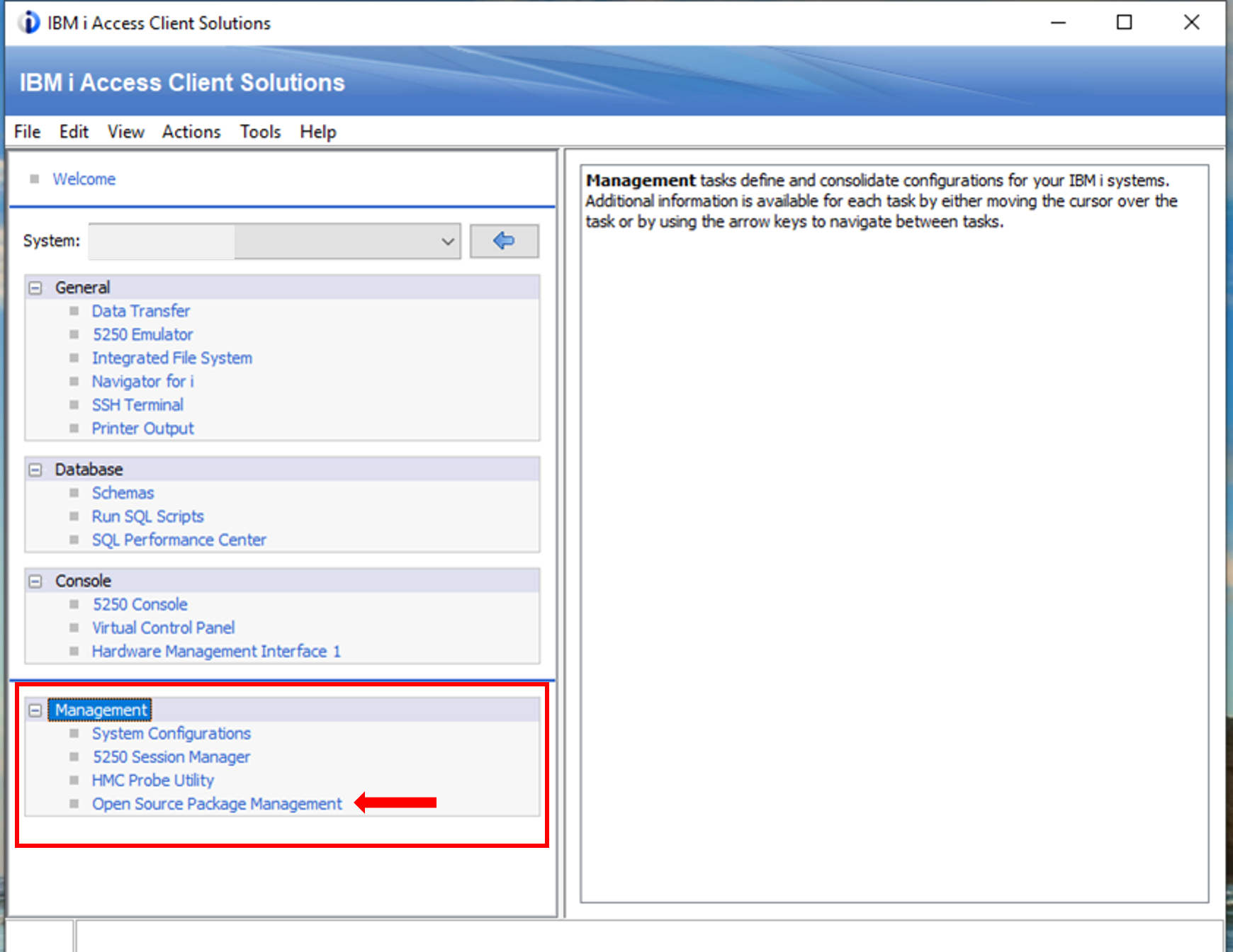
Open the IBM i ACS Main User interface, and select the option for "Open Source Package Management" from the left-hand Management group.
Step Three: Connect to SSH
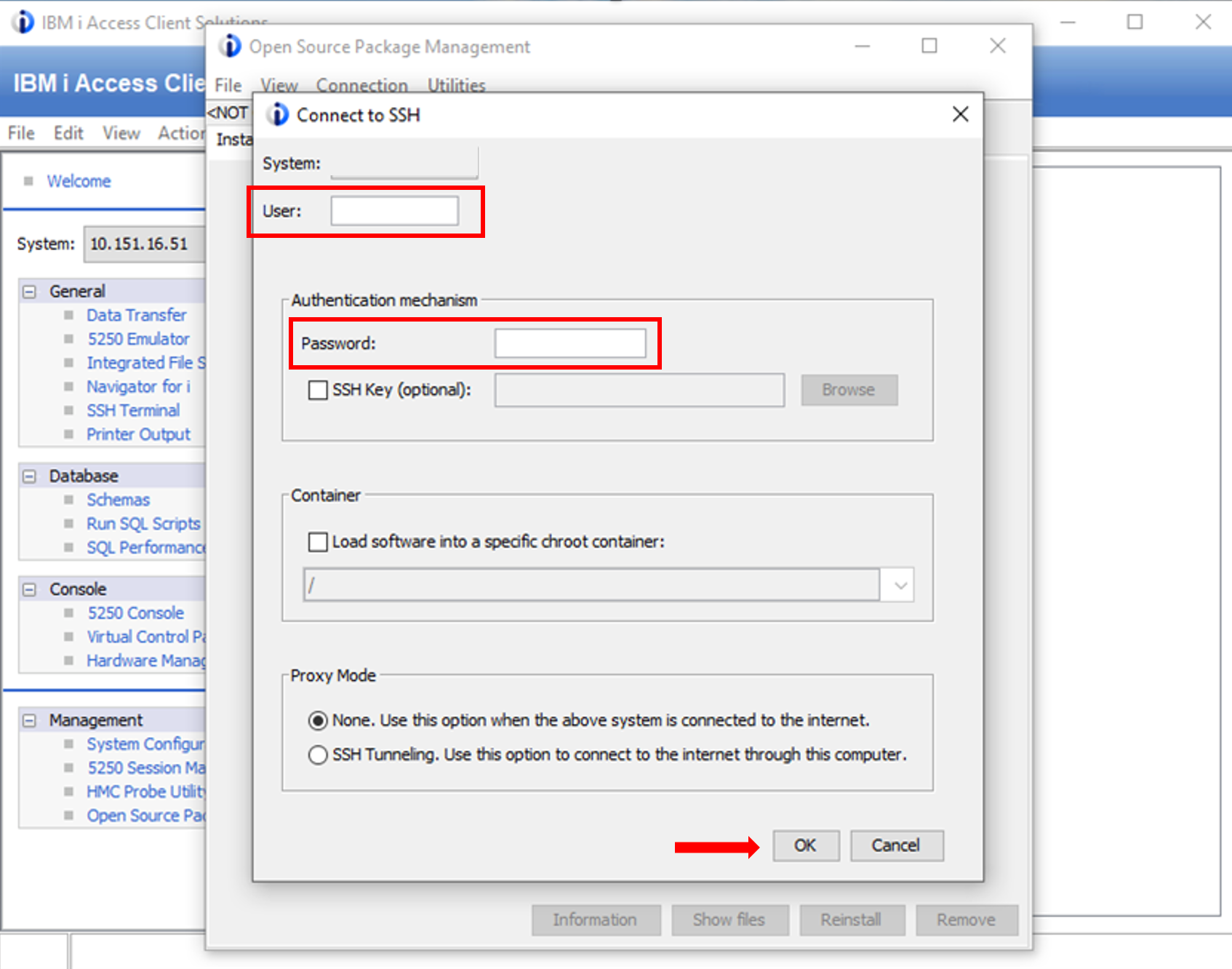
Connect to SSH with your IBM i username and password. Click "OK."
Step Four: View Available Updates
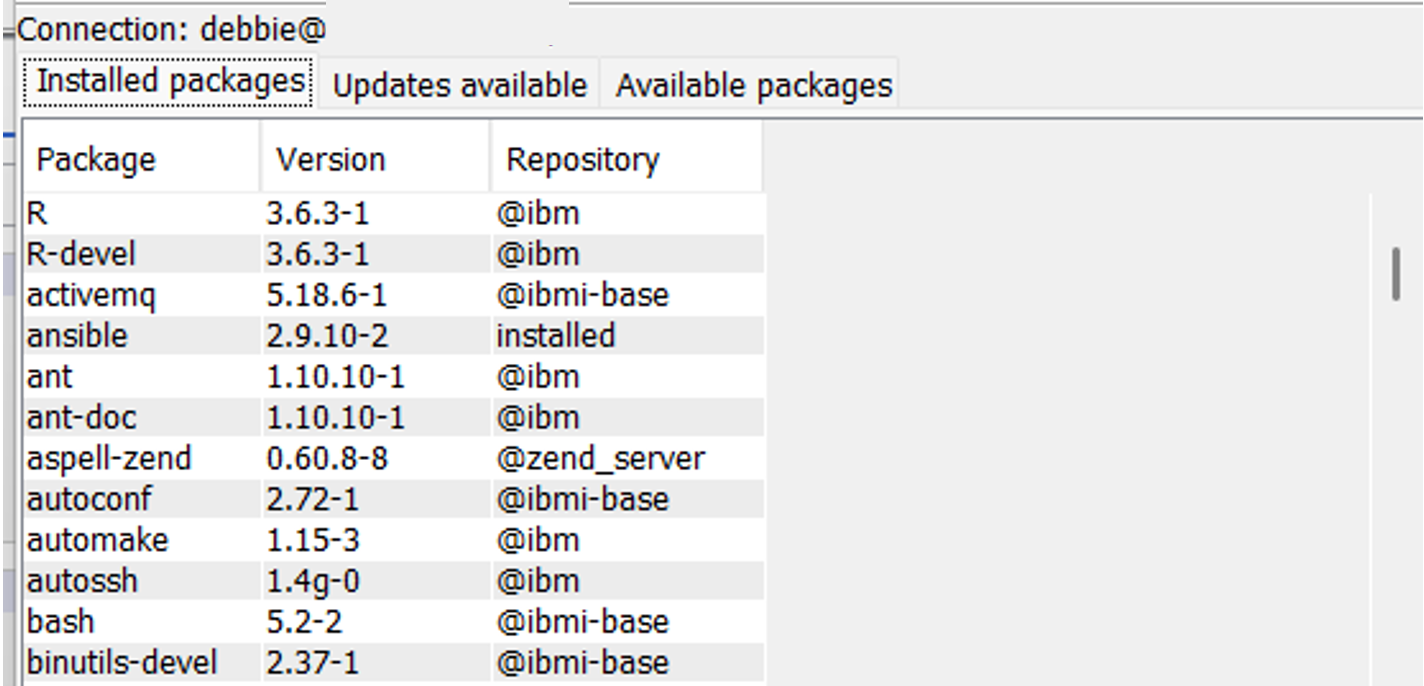
After clicking "OK," a list of currently installed open source packages will be displayed.
Step Five: Update all IBM i Packages Under "Updates Available"
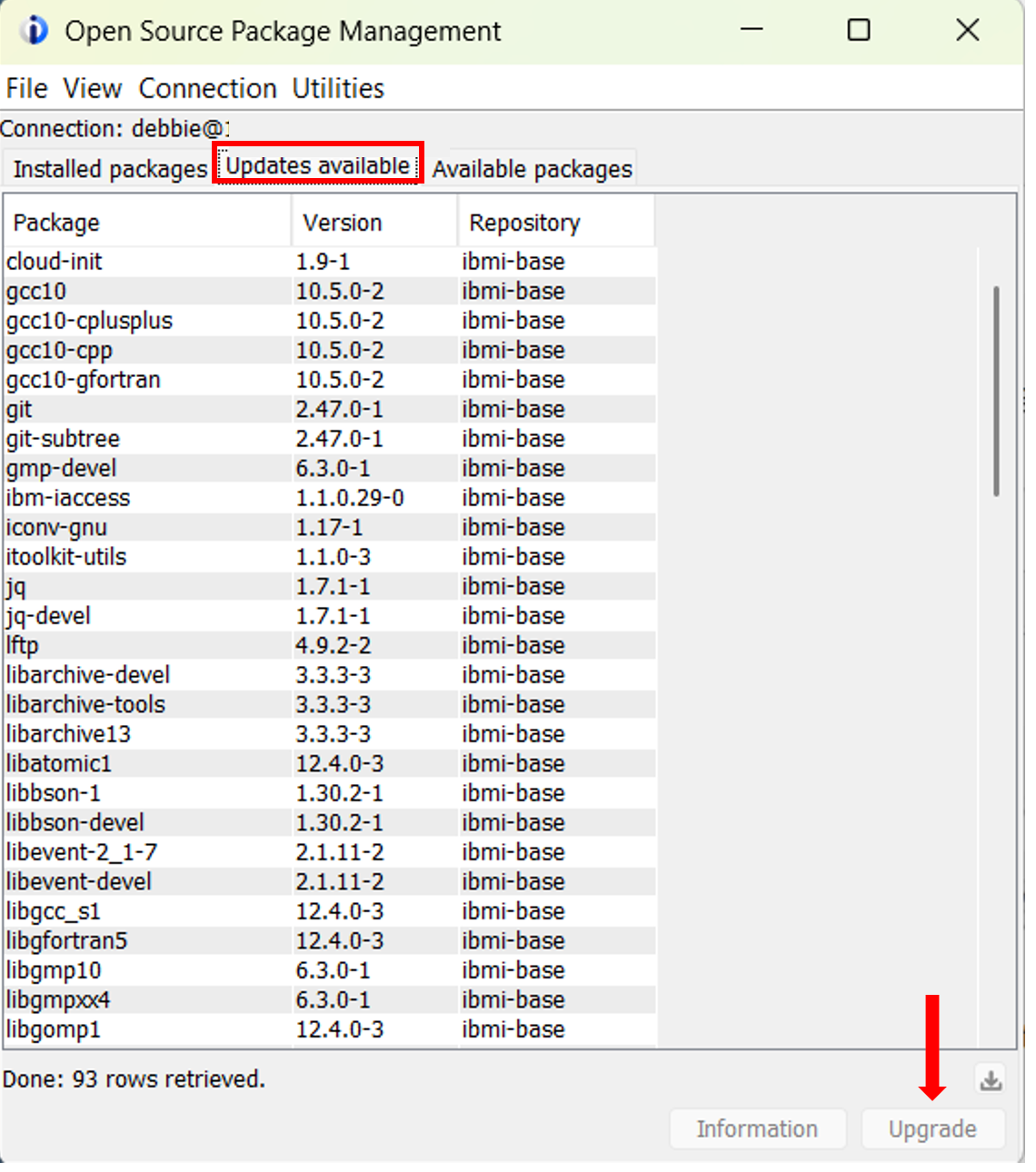
All installed IBM i packages listed under "Updates Available" need to be updated. Note: do not select any packages that reference "zend" in the Repository. Simply click the package(s) to update, with the option to select multiple packages at once.
Click "Upgrade."
Step Six: Accept the Download Size
All selected packages, as well as any detected dependencies, are displayed along with the size of the downloaded packages. Select "Y" to accept the download and continue.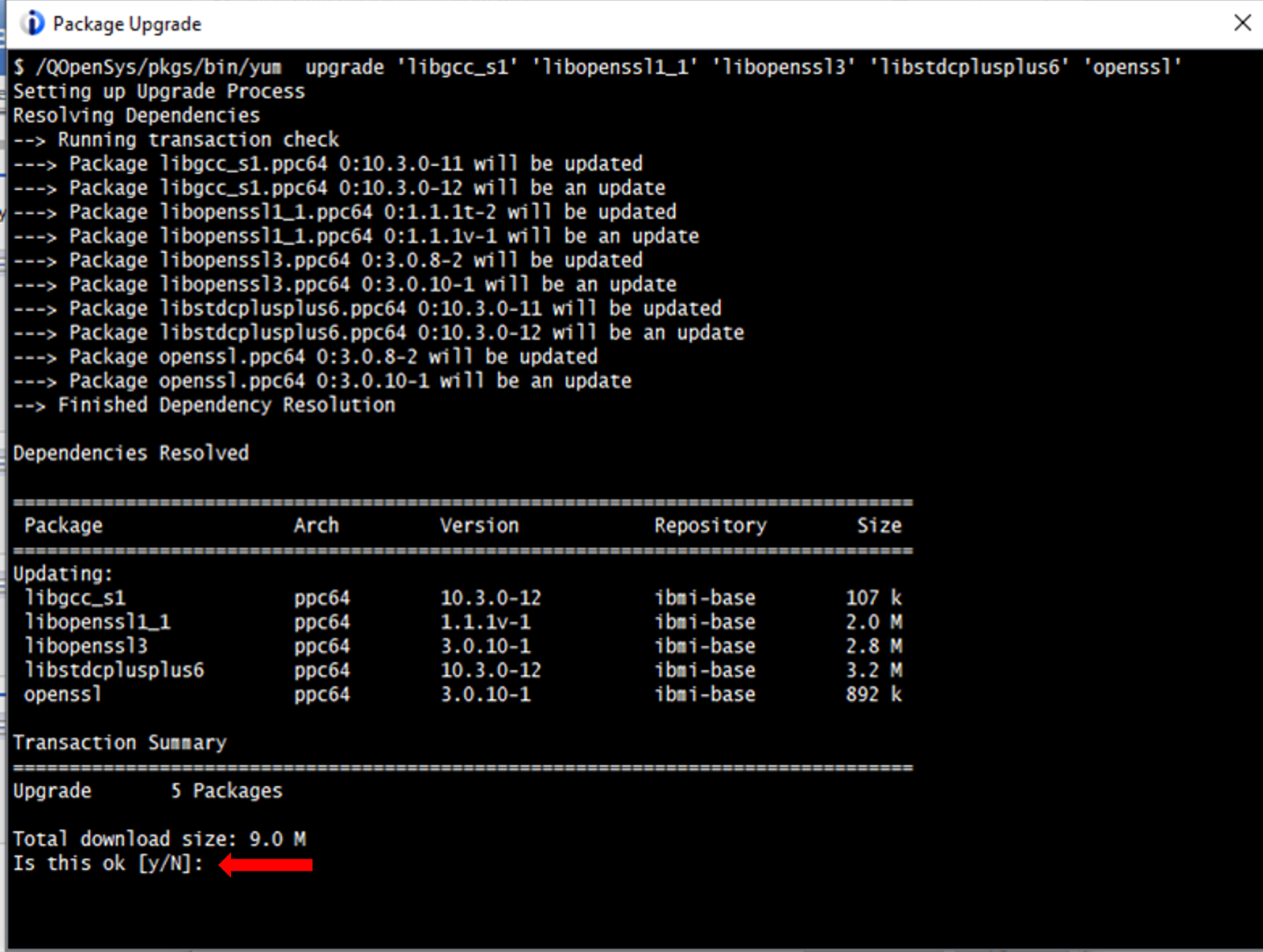
Step Seven: Wait for the Process to Complete
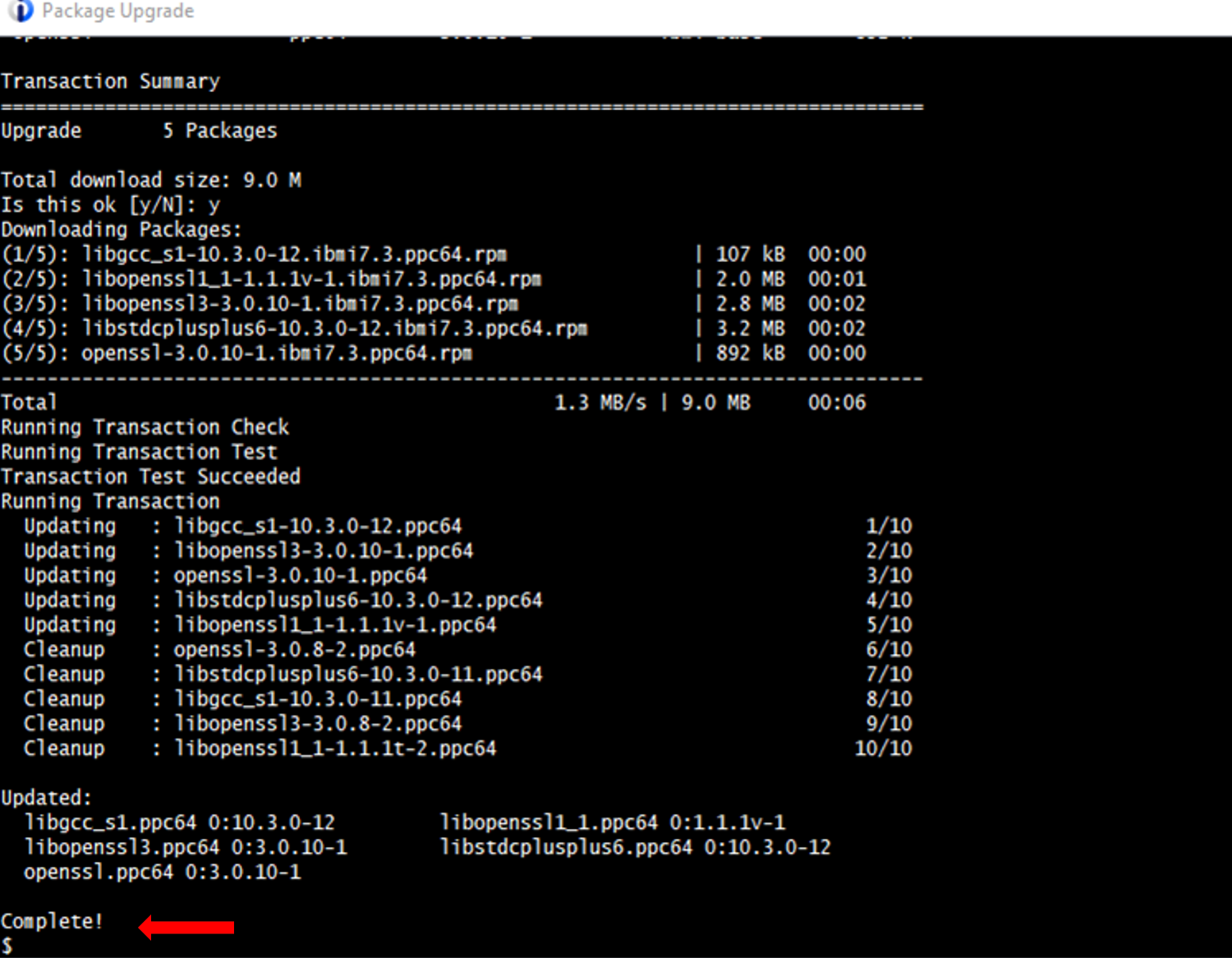
Wait for the process to run until the upgrades are finished and the window indicates ‘Complete!’ followed by the $ prompt, then close the window.
Step Eight: Verify
You are returned to the "Updates Available" tab on the Open Source Package Management window.
In some cases, there may be additional IBM i updates available after a set of upgrades is complete. Continue to upgrade all available packages until there are no IBM i updates listed anymore.
The installation of Zend Server will upgrade all necessary IBM i packages as well. However, upgrading them first within OSPM speeds up your Zend Server installation, as all of the underlying IBM i dependents are already in place.
Back to topWhat Happens if My IBM i OSPM References V7R2?
IBM i 7.2, or V7R2, is an EOL IBM i version that can cause some issues in upgrading. If you open the IBM i Open Source Package Manager, make sure to look for any references to this version, as shown below:
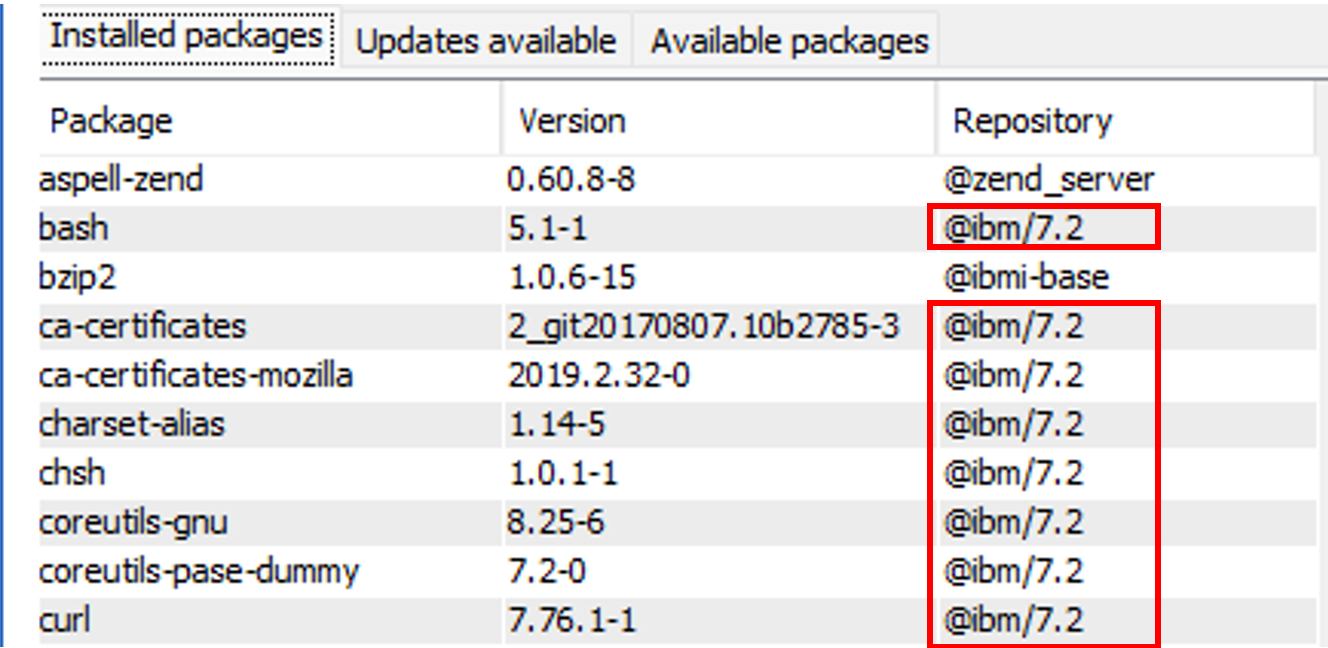
In this scenario, I strongly recommend that you open a support case with Zend Technical Services to discuss your next steps. This is because your system will likely have many IBM i packages that need to be installed, then updated. Our experts are ready to tackle such a large undertaking, and we have the required experience to ensure that everything upgrades smoothly and without disruption.
Back to topFinal Thoughts
Keeping IBM i Open Source Package Managment up to date is a critical step in maintaining stable, supportable IBM i environments, especially as PHP workloads continue to evolve. Regularly updating OSPM reduces dependency conflicts, improves system reliability, and simplifies Zend Server and ZendPHP upgrades by making sure required packages are already in place.
As Zend Server EOL approaches, now is the right time to build good package hygiene and plan your next move. Whether you're preparing for a ZendPHP and ZendHQ migration or troubleshooting legacy dependencies, proactively managing open source packages will save time, reduce risk, and smooth the path forward.
IBM i Upgrade and Modernization Support
Zend handles the toughest problems in PHP, including for those deploying on IBM i systems. If you're looking to upgrade your PHP web applications, we have the services and expertise required to streamline the process.
Additional Resources
- Solution - Zend Server Migration Options
- On-Demand Webinar - Managing Mission-Critical Web App Migrations
- Blog - Updating PHP for More Secure Web Apps
- Blog - Using the PHP Job Queue to Improve Web App Performance
- Blog - Is PHP Still Relevant?